Introduction
Dateio Platform SDK provides UI screen components that enable bank mobile app to interact with Dateio server application. The SDK contains API communication with the server and UI rendering in a single solution. The main focus of the SDK is to make its implementation fast, simple and easily upgradable with new functions.
The SDK is available for Android and iOS platforms. We support min API version 23 for Android and 14.0 for iOS. Technically, it is also possible to support API version 21 and iOS 13.0. Older versions support is not possible due to technical restrictions.
The current version of the SDK is 1.8.5. You can find changelog and news here.
Our tests show that SDK will increase app size approximately by 6MB in download size and 18MB in install size for iOS and 5MB and 36MB for Android (app prior not using Kotlin, so this might be lower in real usage).
Dateio will prepare the SDK configuration based on the bank design manual and additional bank needs. The bank can further customize the config without the need for new SDK build. The configuration allows you to set colors, spacing, texts, perform minor UI changes and etc.
In the demos section you can find runnable demo applications for most common usage of the SDK. Both for Android and iOS. In this section you can also find Bank Gateway backend example. This example shows how to connect your backend to Dateio API. Also, we can prepare application demo for your specific Tech Stack and show you how to implement our SDK in it. For that purpose, please see page let us know about your Tech Stack.
In the image below, you can see the solution architecture context of the SDK:
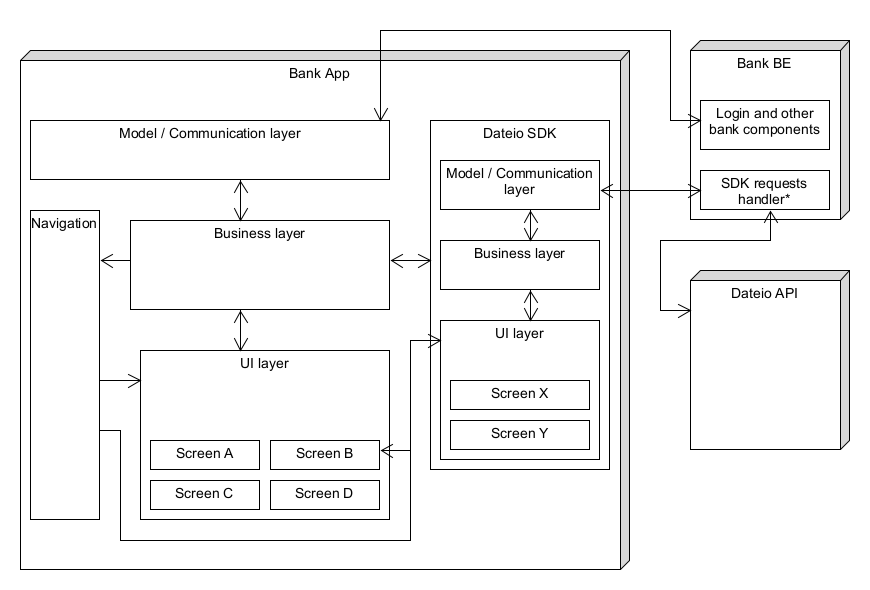
Note: SDK request handler – it is up to the bank if this part will be integrated into the existing bank solution or if it will be more standalone. But you will need to map access token to client ID here.
For proper functioning, the SDK requires connection to internet. Offline actions or caching are not supported. The bank should check internet connection before navigating to SDK screens. If the connection is unavailable SDK will show an error message.
For SDK usage itself we use Maven local repository for Android and XCFramework or Cocoapods for iOS. If your Tech Stack requires another solution, please let us know. We will assess the feasibility based on your input.
Getting the SDK
The only valid version of the SDK will always be on our SFTP server. Never integrate the SDK from another source.
On SFTP there will be current version and older versions of the SDK. Dateio will provide access and credentials upon request. This restriction is also for security reasons.
We will need your public key to provide access to SFTP, since we use public key authentication.
You can use https://status.dateio.eu to check SFTP availability.
Communication with the bank backend and Dateio API
SDK configuration allows to define URL of the bank backend API (see how on Android, or on iOS). The bank backend API will be directly communicating with Dateio API as is shown in the image below:
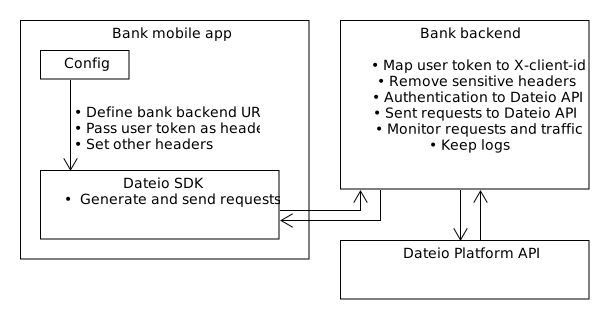
The bank backend must authenticate against Dateio backend. Authentication is realized via OAuth 2.0. Bank backend obtains token from Dateio at first and then uses it with every request – sending it in Authorization header.
How to obtain an authorization token is described in bank backend section.
Bank BE should only pass all requests from SDK to Dateio API, strip user token header and add headers to requests which will be identifying user (Client ID) and bank (Authorization).
Please don't implement any request whitelist, since this would make it much more difficult to update SDK.
Bank BE is used because of following reasons:
- Analytics – you might monitor traffic and requests.
- Security – user token will not be even sent to Dateio API. In case of any suspicious requests, you might restrict them.
- Technical – you need to identify to Dateio as a Bank via OAuth2, Dateio does not have information for client identification.
Rather than calling Dateio API directly.
Client authentication between the SDK and the bank backend API can be done with custom headers. The custom headers can be set by SDK Config and sent with to bank backend API with each request. An example of the authentication header is JWT token. The specific implementation and format depends on bank mobile app implementation and bank backend.
You can find our demo Bank backend here.
User identification flow
User is identified by a token, which you will pass as header to SDK configuration (see how on Android, or on iOS). Then you need map this token to Client ID on the Bank BE and send it to Dateio API.
Client ID must always be derived from user token on Bank BE. Never send headers like client-id,x-client-id, clientid, client_id and etc. directly from the SDK.
Detailed flow is shown and described below:
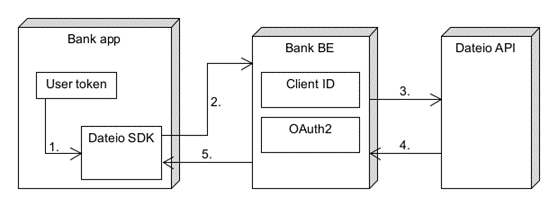
- Bank app have token identifying users.
- Token will be sent to Bank BE as header. You might choose your key and token format. Usually this will be JWT token or similar token.
- On Bank BE you will process this token and get Client ID from it. Also, you have to authenticate against Dateio backend via OAuth2 (as a bank) and add appropriate headers. Then, you will send a request from step 2 to Dateio API with header
X-client-idwith Client ID in it. - Dateio API will process request and send response back to Bank BE.
- Bank BE will send a response from Dateio API back to the SDK.
SDK components
The components described below can be used as “drop in” screens. Meaning, bank inserts these components into bank app (see how on Android, or on iOS) and SDK will handle all interactions within these screens.
- Screen with offers list – list with offers, which might be activated or browsed into offer detail (separate sub-screen). In detail the rules of offer, its shops and other offer details are shown. This screen might use user location when user goes to "nearby" category.
- Screen with cashback history – list with cashback usage history.
- Screen with search and filter by category – offers can be searched by user text input or filtered by category. After filter is applied, list with relevant offers is shown. This screen might use user location when user goes to "nearby" category.
- Screen with shops – list with shops where user can use offer. This screen might use user location. In that case, offers will be sorted by distance.
- Screen with map – a map with shops where the user can use offers. This screen requires the user's location.
User consent and registration to program
Before navigating into SDK, bank has to get client consent and register user to Dateio API.
This consent should be requested and stored by standard bank approach (e.g., via a new page in app or a popup) and then saved in bank database. This consent has to be revokable.
SDK does not provide consent screens or any other solution for collecting and storing the consent, since it might differ per bank regulatory compliance and/or internal policies. SDK offers function RegisterUserToApiUseCaseDefault().invoke() that will register user on Dateio BE.
execute() is deprecated and will be removed in coming versions. Use invoke().Similarly, SDK does not contain any solution for revoking consent and bank has to solve this on their side. For user deletion from Dateio BE you can use function DeleteUserUseCaseDefault().invoke().
When bank gets user consent and stores it into its internal system, the bank also needs to register user into Dateio Platform. This might be done by two approaches:
- By calling SDK function
RegisterUserToApiUseCaseDefault().invoke()with user token set by SDK configuration and proper mapping on bank BE to client id. This is preferred solution and should be sufficient for most of use cases. - By sending a request to Dateio API directly - e.g., intercepting consent request on bank BE when bank receives it and sending the request to Dateio API with client id header settled on this call. If you think you will need this approach, please consult it with Dateio in advance.
Similarly, when user removes his consent, you can call SDK function DeleteUserUseCaseDefault().invoke() or call it directly from Bank BE. When Dateio receives this request, we will process client deregistration and plan user data deletion.
SDK methods call the following endpoints:
POST <bankURL>/registrations/instantDELETE <bankURL>/client
Where <bankURL> is URL of Bank BE. As you can see, we also use DELETE REST method. Make sure, that you allowed it on your Bank BE. These functions return Result<Unit, DomainError> based on the success of the request. You can use them directly in bank application like this:
For Android and for iOS like following:
If you want do direct calls from bank BE use same endpoints to Dateio API and add header X-Client-Id to these requests. For more info see bank backend section or see our demos.
Available Environments
Dateio will provide two environments. One for development and testing, which will be connected to the UAT environment. The second one will be production environment.
Development SDK is debuggable with request logging.
Working with user GPS location
The SDK includes optional location-based functionality. If enabled, the bank must obtain user consent before navigating to the SDK and requesting location access.
Consent and Permission Handling
- If the user grants consent, their location will be used only when necessary — specifically within the “nearby” category, on the map or on dedicated pages with shops or offer details. This enables navigation to the nearest available offers or stores.
- If the user has not previously granted system-level location permissions, the SDK may prompt them via the standard system permission dialog.
- The user’s decision will be respected via standard options such as “Never ask again”, “Use only once”, or “Don’t allow”.
Data Usage and Privacy
- When location-sharing permission is granted, the SDK retrieves the user’s location and sends it to the Dateio API to sort offers or shops by proximity.
- Neither the SDK nor the Dateio backend stores or uses location data for analytics purposes. Location information is not analyzed, tracked, or aggregated on a per-user or group level. After processing, it is not retained for any analytical purposes.
- For maps, the SDK uses Google Maps and Apple Maps.
How to add key for Google Maps?
Use the standard approach for adding the Google Maps key to your app in AndroidManifest.xml.
Notifications
The SDK provides mechanism by which user can go into separate screens by clicking on notification or in app banners. Dateio generates notification data and sends it to the bank in CSV format. You can see examples below:
The bank then will directly send push notifications into the banking app, where notifications marked as Dateio, should be passed into the SDK which will then manage routing or actions. Push notification format itself is up to bank. SDK-wise, it is important to pass to SDK notification identification - MSG_ID value from the Dateio CSV / push payload and notification action and data e.g. you will redirect user to offer detail and offer id.
We suggest using the following notification types for action mapping: NEW_OFFER, NEW_MERCHANT, MISSED_X, EXPIRATION_X - navigate to the offer detail using OPEN_OFFER_DETAIL action and OFFER_ID. CASHBACK_PAYOUT - go to history using OPEN_OFFER_HISTORY action.
Detailed flow is shown below:
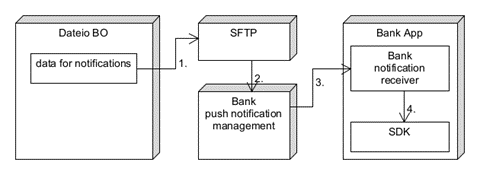
- Dateio will generate data for notifications and upload them on SFTP.
- Bank will download data from SFTP into their push notification management system.
- Bank will send notifications to its app with prepared data.
- Bank app will receive push notification and when it originates from Dateio, pass notification data to SDK. Based on notification data SDK will show proper screen (e.g. offer detail) or perform action (activation on button click or another).
Notification data can be set to SDK with Configuration.processNotification(..) for Android and via mainScene?.processNotification for iOS. You can find demo how to work with notification both for Android and iOS in our demos section.
Make sure not to call both your standard navigation to the SDK and the processNotification method, as the SDK will automatically handle navigation based on the provided data and handler.
Custom analytics
SDK provides built-in support for collecting custom analytics on the bank's side. Analytics on the bank side is considered optional and not required by Dateio. For security reasons and to minimize third-party dependencies we use custom solution. Analytic can be used via setting custom logger by:
In this snippet you can see that BankLoggerCallback needs to override logAction method and use the following parameters:
action- predefined action in SDK. Allowed values are fromAnalyticsActionenum:OFFER_ACTIVATION,OFFER_DEACTIVATION,CUSTOM_NAV_BUTTON_1_CLICK,CUSTOM_NAV_BUTTON_2_CLICK,SEARCH_RESULT_USED,SHOW_HOW_IT_WORKS,SHOW_VOUCHER,COPY_COUPON,NOTIFICATION_OPEN,PAGE_ENTER, andPAGE_LEAVE. ActionsPAGE_LEAVEandPAGE_ENTERare called every time the user visits or leaves SDK screen. That means, even when he puts application to background (if SDK screen were visible before), visits an e-shop, map and etc. By that you also can measure how long the user spends on specific screen or in the SDK.origin- predefined action origin in SDK. It can be screen/page or some component. Allowed values are fromAnalyticsOriginenum:DETAIL- offer detail, which was opened fromGALLERY.GALLERY- main screen with offers.HISTORY- history with user transactions.HOW_IT_WORKS- a popup explaining how SDK functions works.MAP_DETAIL- offer detail, which was opened fromOFFERS_MAP.MAP_PIN- an offer pin on aOFFERS_MAP.OFFERS_MAP- screen with a map showing offers around current location.SEARCH- search screen with input and category filtering.SEARCH_RESULT- search or category filtering results, containing an offer list, similarly likeGALLERY.SHOPS- the screen with shops is displayed. Valid only if there is a standalone screen with shops.
id- object id. Mainly for offers. Important only when you know offers ids. Otherwise useinfoparameter.info- object info. E.g. offer name as client see it.
It is up to the bank whether you want to log actions one by one to your BE, collect them and log them in batch or use third-party solution like Firebase or another service.
More technical details are available on Android configuration section and iOS configuration section.
Notes about security
Since user token is sent only to Bank BE, Dateio won't receive these tokens. SDK doesn’t save or edit these tokens in any form. SDK only adds these tokens into headers for requests that are sent to bank BE.
SDK doesn’t implement root / jailbreak detection as this should be already checked in host application.
SSL pinning on Android should be solved by network-security-config where possible (Android API 24+). For older versions SDK implement ssl pinning setter and support Certificate Transparency via sslInterceptor and sslNetworkInterceptor methods.
On iOS you can pass SSL fingerprint to SDK config and SDK will ensure SSL pinning itself as it is not possible to enforce this on system level on iOS.
Our process about software development, security and testing is described here.
Accessibility
SDK is developed according to Web Content Accessibility Guidelines and platform specific best practices. Also we periodically test accessibility automatically (e.g. via Accessibility Inspector) and manually. By that we ensure the SDK maintain high accessibility for all users. We might share the latest tests and findings with you upon request.
Mainly these features are developed and tested:
- All fonts sizes are scalable and respect system settings.
- High ratio of contrast between text and background is maintained.
- All non-decorative images and icons have text alternatives.
- VoiceOver and TalkBack are supported.
- Buttons and other clickable elements respect minimum system sizes.
Since the SDK is configured to bank's brand and colors and UI is customized to agreed design, previous points should be discussed when discussing final design as they might be influenced by design.
App crashes monitoring and bugs reporting
For app crashes we might use your standard monitoring tool (e.g. Firebase Crashlytics, Google Play Console and etc., Dateio does not require a specific monitoring tool) in this case, we will need add our account to view app data. Read only permission is sufficient. Data might be restricted for SDK section only.
Dateio strongly recommends monitoring the SDK on the bank side. Bank audit could flag the absence of SDK monitoring as undesirable.
Dateio does not want to integrate any specific monitoring tools directly into the SDK because of potential leak of sensitive client data, for example, the token and IPs to third party, for privacy compliance and because of technical limitations of these solutions.
Bank can also report bugs findings to Dateio e-mail: sdk-reports@dateio.eu. In this case, a detailed use case, device type or identification and screenshot, if possible, will be needed.
Bugs will be tracked in our internal Jira and solved according to priority . Security issues will be solved with high priority - see our security section. New versions of the SDK will be delivered by standard process to SFTP.
Where to head next
This article should give you an overview how the SDK works. You can continue to implementation detail for Android or iOS and download our set of demo apps.