Bank backend
This document describes how the Bank backend (hereinafter referred only as Bank BE) should call Dateio Platform API (Dateio BE) services to fulfil the needs of Dateio SDK. Both test and production environments are described.
Dateio BE accepts only REST API calls, access through a web browser is not possible.
Overall architecture
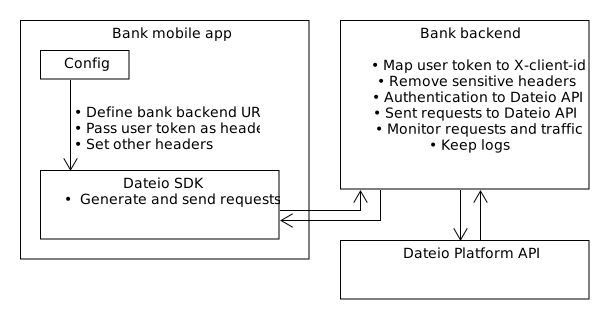
SDK calls Bank BE API and not directly Dateio BE. This is for security and monitoring reasons, since bank mobile applications are usually using a token (e.g. JWT) linked to an individual client or other sensitive information. This token should not be exposed to a 3rd party, since it could be theoretically exploited to act on client behalf. Also Dateio and Bank need a common X‑client‑id to identify the client across API calls, cards linked to client, transactions, and cashback payout. Dateio is not able to extract this client id from token and it is not desirable to send this as plain id directly from mobile application. Last but not least with this solution bank can monitor and log requests, traffic and others program metrics.
The Bank BE API itself will be directly communicating with Dateio BE. Dateio prefer that Bank BE just pass requests from SDK to Dateio BE, add header to requests which will be identifying user – see X‑client‑id, authenticate against Dateio BE (see next chapter) and remove all sensitive headers, e.g., that with user token.
It is up to bank decision if Bank BE will be standalone system or it will be added to existing more complex one. SDK contains method that sets endpoint that all communication will be sent to. You can see example of communication in SDK request flow example. For Bank BE demo see demos section. It contain simple API gateway written in Kotlin, that shows what functions Dateio need from Bank BE.
Authentication
API is secured with OAuth 2.0 authentication. At first Bank BE must obtain authorization token via following request:
Where:
client secretandbank idis provided upon request via secured channel.urlURL that you will get from Dateio. Not stated for security reasons.realm=fo-uatfor UAT environment,fo-prodfor PROD environment.
Then you can call Dateio BE. You have to obtain a new token when the current one is expired.
Make sure to reuse this token for all requests to the Dateio BE until it expires. Request a new one only after the old token expires or is about to expire. Generating a new token for every request is not a desired use case and will lead to your backend being blocked.
Dateio BE requests
The Bank BE should resend every request it receives to Dateio BE – including all headers added by SDK, except user token and other sensitive headers, if added.
Before resending request to Dateio, following headers must be added:
X-client-id– client ID known to Dateio. Should be deduced based onuser tokensend from mobile app.Authorization– authorization token obtained via Authentication.
When returning response to SDK, please make sure to add these headers and values:
cache-control–"no-cache, no-store, max-age=0, must-revalidate"pragma–"no-cache"
Health-check
To check Dateio’s API availability you can use the following request:
You will get url from Dateio. Not stated for security reasons. Health-check is available for both UAT and PROD environments. HTTP status 200 means Dateio BE is available.
You can also use https://status.dateio.eu to check API and SFTP availability.
Environments
UAT environment
You will get uat-url from Dateio. Not stated for security reasons. Dateio provides only one development environment, but you might connect multiple bank environments to it, if necessary. Make sure that you don't duplicate users id between them.
For auth token see Authentication section.
Example of a curl query:
PROD environment
You will get prod-url from Dateio. Not stated for security reasons. For auth token see Authentication section.
Example of a curl query:
SDK request flow example
This section shows how the flow of requests should look from SDK, through Bank BE, to Dateio BE. Diagram below illustrates the flow by highlighting connections in the communication schema. In the following subsections, you can see an example of two requests. They both refer to the use case of fetching a list of available offers. The first one shows what requests sent from the SDK look like and what Bank BE will receive. The second one shows how this request should be forwarded to Dateio BE via Bank BE.

The text coloring illustrates relations between request values:
- Green color marks values that must remain identical. These values are pass-through and must be forwarded exactly as received from the SDK - without any modification, transformation, normalization, defaulting, or hardcoding - including query parameters, HTTP headers, and body fields.
- Blue color marks receiver host URLs. In the first case, the receiver is the Bank BE. In the second case, the receiver is the Dateio BE. Both URLs must be configured correctly for the target environment. The values shown in the examples are illustrative only.
- Orange color marks the relationship between authorization token in the original request and the
X-Client-Idheader in the forwarded request.Please note thatAuthorizationheader in the first request example is used here as usually used identifier for the user session. This name might differ in your implementation. SDK allows you to set any name for this header via methods described on Android section and on iOS section. - Red color expresses that
Authorizationheaders have different tokens in this example. The first with valueBANK_CLIENT_ACCESS_TOKENcontains bank client access token to authorize against Bank BE. The second valueDATEIO_BE_OAUTH_TOKENis the authorization token of the Bank BE to authorize against the Dateio BE. See Authentication for more details.For security reasons, it is important to never forward the bank client access token to Dateio BE. Bank BE must always strip it and add by itX‑client‑idheader.
Request from SDK to Bank BE
This example shows one of many requests that can be sent from the SDK to Bank BE. You can see request path, path query, http method, headers and body. Host URL backend.bank.eu is configured via Configuration.api.urlHost. Authorization header contains BANK_CLIENT_ACCESS_TOKEN which refers to access token handled by the bank application which is injected to the SDK. Before expiration, it needs to be refreshed by the bank mobile application. You will need to check its validity on each request and refresh it if needed and re-injected it via Configuration callbacks. See chapter Android Configuration and iOS Configuration for more detail.
REQUEST: https://backend.bank.eu/dateio/offers?shopsSortBy=ESHOP_FIRST&markAsSeen=MANUAL&pageNumber=1&shopsMaxCount=5&pageSize=8&sortBy=DEFAULT&category=31&type=ALL METHOD: HttpMethod(value=GET) COMMON HEADERS -> Accept: application/json -> Accept-Charset: UTF-8 -> Accept-Language: en -> Accept-Version: 30 -> Authorization: BANK_CLIENT_ACCESS_TOKEN -> Device-type: mobile android -> Request-ID: 1769689010850-lvghmczvnw -> User-Agent: Bank app (v 1.11) CONTENT HEADERS -> Content-Length: 0 BODY Content-Type: null
Request from Bank BE to Dateio BE
The second example shows how the first request from SDK should be forwarded to Dateio BE through Bank BE. Bank BE needs to make three modifications:
- Set host URL to Dateio BE.
- Set
Authorizationvalue to authorization token obtained from here, to authenticate the request against Dateio BE. Never forwardBANK_CLIENT_ACCESS_TOKENfrom the first request. If this token expires, repeat the authentication step against Dateio BE. Just make another request to obtain new token. - Add
x-client-idheader with value corresponding to concrete user. This identifier should be derived from theBANK_CLIENT_ACCESS_TOKEN.
Except for these three modifications, the request needs to remain identical, containing all the original information.
REQUEST: https://need_to_be_changed.dateio.eu/dateio/offers?shopsSortBy=ESHOP_FIRST&markAsSeen=MANUAL&pageNumber=1&shopsMaxCount=5&pageSize=8&sortBy=DEFAULT&category=31&type=ALL METHOD: HttpMethod(value=GET) COMMON HEADERS -> Accept: application/json -> Accept-Charset: UTF-8 -> Accept-Language: en -> Accept-Version: 30 -> Authorization: DATEIO_BE_OAUTH_TOKEN -> Device-type: mobile android -> Request-ID: 1769689010850-lvghmczvnw -> User-Agent: Android FM based app -> x-client-id: 12345 CONTENT HEADERS -> Content-Length: 0 BODY Content-Type: null
Common Integration Mistakes
To ensure a stable and correct connection and functionality between the SDK, Bank BE, and Dateio BE, please avoid the following common mistakes during implementation:
- Hardcoding the API version - do not hardcode the API version (
Accept-Version) in the Bank BE nor in mobile application. Always forward the version sent by the SDK. Otherwise you will receive unexpected results when SDK version is updated. This change is for edge cases only and will be communicated to you in advance. - Filtering headers - do not drop any headers. All headers sent by the SDK must be forwarded to Dateio BE. Otherwise you will receive unexpected results.
- Truncating query parameters - ensure the entire query string is forwarded exactly as received. Do not omit any parameters. Otherwise some functions might not work as expected.
- Internal mapping - do not perform any internal mapping or alter the endpoint path structure when forwarding the request. Otherwise the request might not reach the intended endpoint.
- Sending client-id from SDK - do not send the
x-client-idheader directly from the SDK. The Bank BE must always generate this header securely based on the authenticated user. - Missing client-id - ensure the Bank BE actually adds the
x-client-idheader before forwarding the request to Dateio BE. Otherwise there will be issues identifying the user. - Forwarding the wrong token - never forward the Bank's JWT (User Token) to Dateio API. The Bank BE must replace the Authorization header with the Dateio Backend OAuth token.
Where to head next
You can continue to specific platform implementation.